How to Share Project Progress and Collaborate on Portfolios with GanttPRO: Dashboard Export and Invitations to Portfolios

Written by: Andrew Stepanov

Andrew Stepanov

Content marketing lead, senior editor

Andrew is a seasoned marketing professional with over 10 years of experience as a writer and editor. Since 2017, he has been a content lead and content marketing strategist for GanttPRO.

See full bio
Reviewed by: GanttPRO Team

GanttPRO Team

Product development

Best practices in project management, productivity, and software solutions. Inspired by the experience of every GanttPRO team member.

See full bio

August 4, 2026 / Estimated reading time: 2 minutes

GanttPRO release: Dashboard export, portfolio invitations

Successful projects depend on keeping the right people informed.

While project teams need full access to day-to-day work, stakeholders, sponsors, and clients often only need a high-level overview of project progress and performance.

At the same time, teams managing multiple projects need an easier way to collaborate at the portfolio level.

In this release, we are introducing Dashboard export as well as invitations to portfolios in GanttPRO.

Share your Dashboard in a convenient PDF format

Your Dashboard in GanttPRO already brings together the most important project metrics.

In one place inside the app, widgets help you:

  • Track your project’s progress, budget, and time spent on tasks.
  • Spot risks before they become problems.
  • Get a clear overview.

Now you can share those insights just as easily.

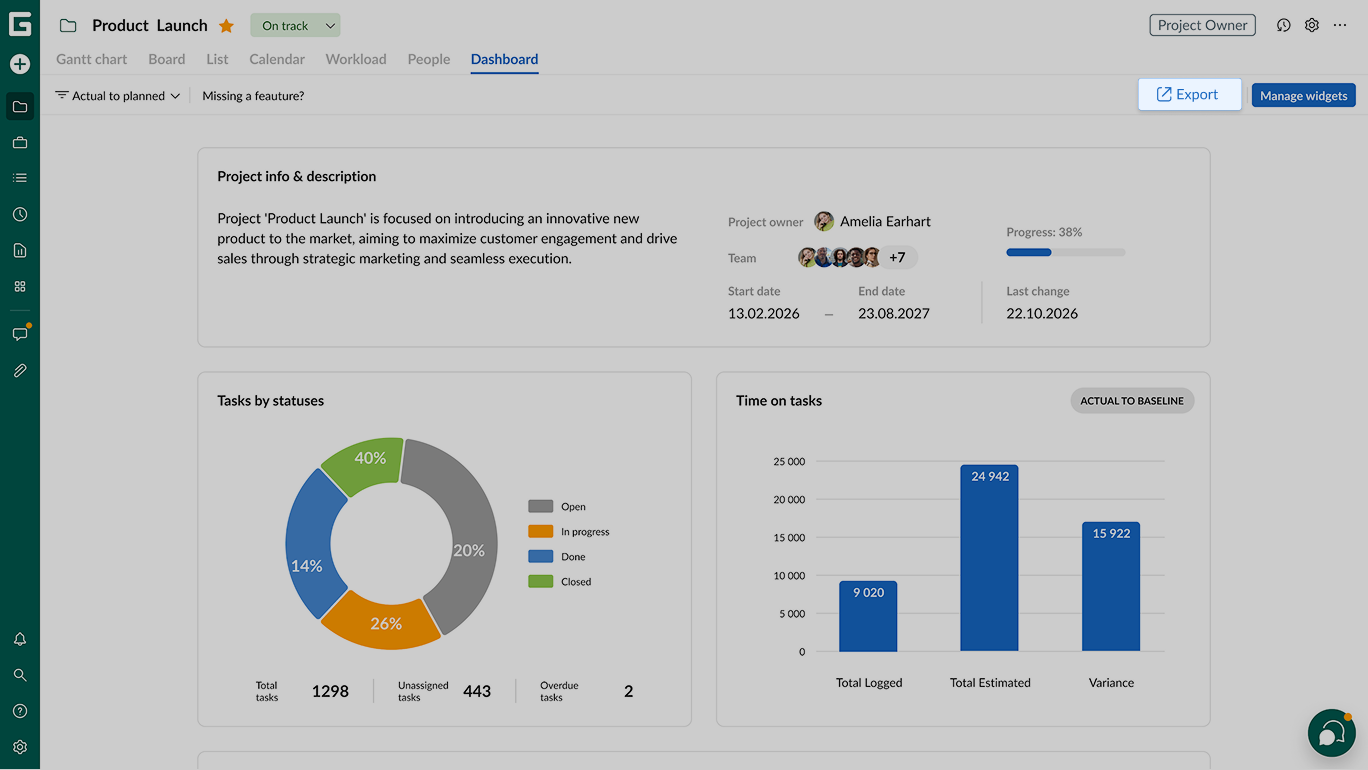
With a single click, you can export your project’s key metrics as a PDF. The exported file presents your project data in a clear, easy-to-read layout with visual charts. It makes it simple to share them with stakeholders even if they don’t have access to GanttPRO.

Find the corresponding button in the upper-right corner.
GanttPRO release: Dashboard export, portfolio invitations

The option is available at project and portfolio levels.

Invite users to portfolios for collaboration and synchronization

Portfolio management often involves several managers, department leads, and stakeholders.

Without portfolio-level access, teams have to share updates manually or duplicate information across projects.

Portfolio invitations eliminate that extra work by bringing the right people directly into one place. 

You will find this feature useful if you need to:

  • Give access to the same portfolio view.
  • Collaborate on portfolios.
  • Stay synchronized across teams.
  • Give stakeholders quick access to portfolio insights.

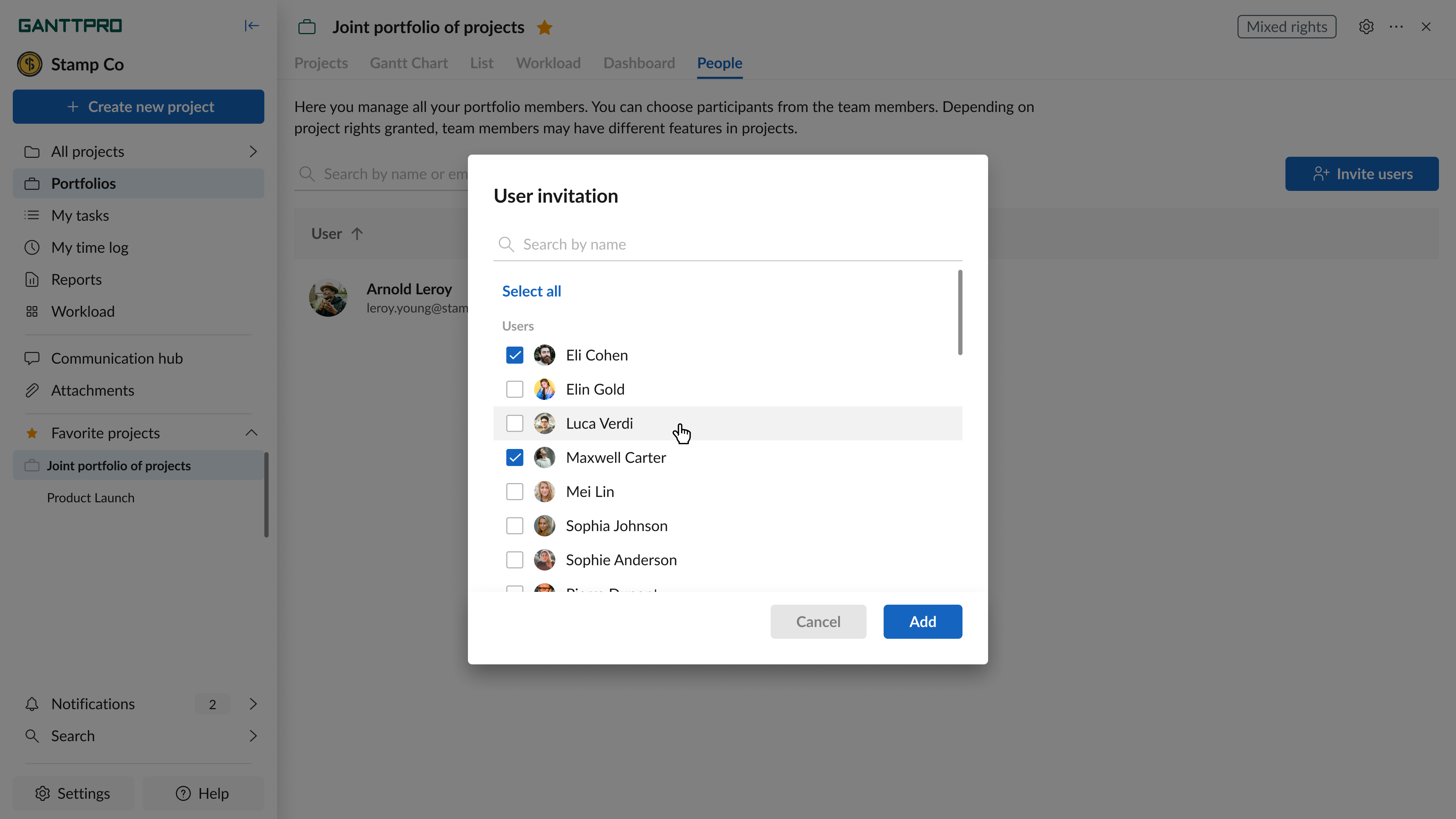
Find the People tab in the header.
GanttPRO release: Dashboard export, portfolio invitations

Invitation to portfolios minimizes:

  • Manual status sharing.
  • Duplicated communication.
  • Switching between multiple projects.

Share project insights more easily and collaborate on portfolios

Whether you’re sharing project updates with stakeholders or coordinating work across multiple projects, Dashboard export and portfolio invitations help you spend less time preparing updates and more time moving projects forward.

If you have any questions, contact us via live chat, and we’ll be happy to help.

0 0 votes
Article Rating
Andrew Stepanov

Andrew Stepanov

Andrew is a seasoned marketing professional with over 10 years of experience as a writer and editor. Since 2017, he has been a content lead and content marketing strategist for GanttPRO.

GanttPRO Team

GanttPRO Team

Best practices in project management, productivity, and software solutions. Inspired by the experience of every GanttPRO team member.

Read also

How to Manage Projects with GanttPRO: Updated List View
Andrew Stepanov/Estimated reading time: 3 minutes
How to Present Your Projects with GanttPRO: Shared Private Link for Board View
Andrew Stepanov/Estimated reading time: 2 minutes
From an Idea to a Plan in Minutes: Meet the AI Gantt Chart Maker
Andrew Stepanov/Estimated reading time: 3 minutes
How to Accurately Analyze Budget, Progress, and Time on Tasks with GanttPRO: Table Reports
Andrew Stepanov/Estimated reading time: 4 minutes
How to Delete Team Members from an Account and Keep Their Data: User Conversion
Andrew Stepanov/Estimated reading time: 1 minute
GanttPRO Wins Top Awards in Project Management and Other Related Fields
Paolo Kukhnavets/Estimated reading time: 5 minutes
How to Boost Productivity with GanttPRO: Filters for Google and Outlook Calendars Sync
Andrew Stepanov/Estimated reading time: 1 minute
How to Accurately Analyze Progress, Budget, and Time on Tasks with GanttPRO: Graphical Reports
Andrew Stepanov/Estimated reading time: 4 minutes
How to Manage Projects with GanttPRO: Updated Board View
Andrew Stepanov/Estimated reading time: 4 minutes
GanttPRO Project Management Affiliate Program: Join It and Get the Highest Comission Rate
Paolo Kukhnavets/Estimated reading time: 6 minutes
GanttPRO Wins Prestigious Awards in Project Management, Marketing Planning, Project Tracking, and More
Paolo Kukhnavets/Estimated reading time: 7 minutes
How to Precisely Track Time Spent on Tasks with GanttPRO: the Timer Widget in the Mobile App
Andrew Stepanov/Estimated reading time: 1 minute
Subscribe
Notify of
guest
0 Comments
Oldest
Newest Most Voted
Inline Feedbacks
View all comments

Join 1M+ project managers!

Create Gantt charts in minutes with GanttPRO and reduce time spent on managing tasks by 40%

Try for free

No credit cards required. No obligation.

0
Would love your thoughts, please comment.x
()
x